Performing a
Citation Search...on
CCH Internet Research NetWork
You can easily find a document on CCH®
InternetSM Research NetWork™ when you know its number or citation.
Let’s look at an example to see how this works.
Assume that you want to find a
document within the Federal Securities Law Reporter.
Note: The following example
assumes you subscribe to the Securities library. If you do not
subscribe to the Securities library, please substitute a library to
which you subscribe.
Steps to take
- Click the Securities tab.
- Click the checkbox next to Federal
Securities Cases.
- Click the Citation Search
button.

- In the box next to the appropriate
citation format, type the number or the citation of the document
you want to locate. For our example, type 91217 in the
field next to FSLR ¶.
- Click the Search button
next to the box in which you entered the number or citation.

In our example, the document matching
¶91217 in the Federal Securities Law Reporter should
be displayed on your screen.
Free Form line
If
you know the complete citation of a document (e.g., “Reg. Sec.
1XXXX”), just type the citation right on the free form line
at the top of the Citation Search template and click the Search
button.
Quick
Link
For
the fastest results when you know a complete citation, try Quick
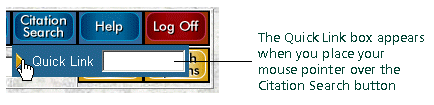
Link. Place your mouse pointer over the Citation Search
button, and you’ll see the Quick Link box appear. Click in the Quick
Link box, type an entire citation, and press Enter. The
document will appear on your screen.