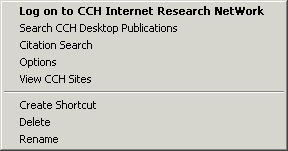
Using the
Login Express options...on
CCH Internet Research NetWork
Login Express has many options you
can use directly from your desktop, including the options menu and
the toolbar. Both the Login Express options menu and the Login
Express toolbar contain many helpful features.
Note: If you do not have Login
Express, you can get it by going to www.business.cch.com/network,
clicking on the Click here to download Login Express
link, and following the on-screen instructions.
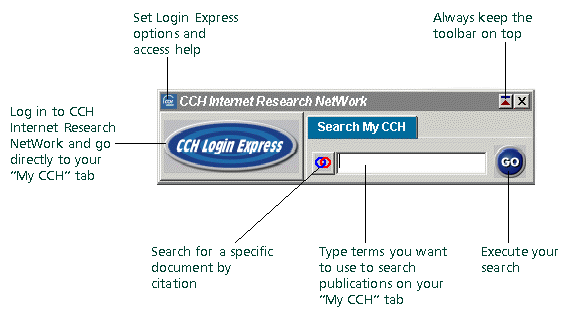
To
view the Login Express toolbar:
- Single-click the CCH Internet
Research NetWork icon located in your system tray.

- Click an option. See the screen
below for details on all the toolbar options.
To
view the Login Express options menu:
- Right-click the Login Express
icon located on your desktop.

- Select and click on an option to
perform that function.