Login Express
updated...on
CCH Internet Research NetWork
Login Express simplifies the process
of signing on to CCH Internet Research NetWork by letting you log in
directly from your desktop. No need to open your browser, locate the
login screen, and enter your User ID and Password. With Login
Express, just click the icon on your desktop and you’ll go
directly to the main screen for Research NetWork.
New Features
The latest version of Login Express
has some value-added features to make your searching experience a
more efficient one.
When you download the latest version,
the Login Express icon is still placed on your desktop with the same
available functions as before. But now, an additional icon is placed
in your system tray in the bottom right corner of your screen.

Here’s what it can do for you...
Double-click the system tray icon to
log into your product right from the desktop. You’ll go directly
to the My CCH tab if you entered your User ID and password during
the installation process.
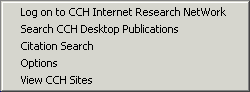
Right-click the system tray icon to
display the Login Express options menu, from which you can perform
various functions.
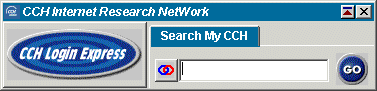
Single-click the system tray icon to
display the Login Express Toolbar, from which you can perform
various functions.
Download Login Express
To
download Login Express:

